If you have even one campaign running Target CPA (tCPA) or Target ROAS (tROAS) that has ever shown up as „limited by budget” (the red status, not the orange one, more on that below), open its bid strategy settings today and check whether its recent actual result was better than the target you declared. If it was, since August 17, 2026 that result has started drifting toward the target, which means it’s getting worse in practice. Nothing is broken. Google simply started taking your target literally.
Table of contentsExpand
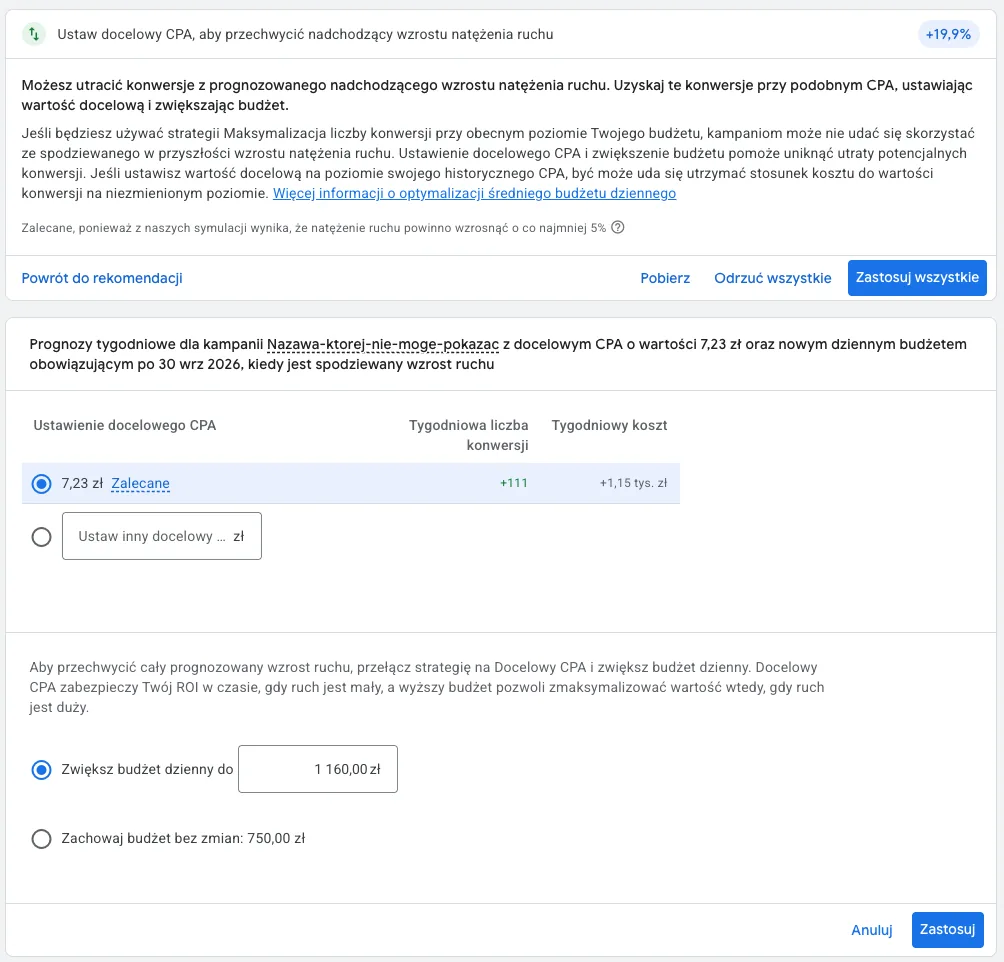
Before you do anything else, do this one thing: use Google’s bid target adjustment tool (available in the panel since July 6, 2026) on every such campaign and decide consciously what to do with the target. The options and the exact direction to move each metric, CPA versus ROAS, are explained below, because it is not symmetrical.
What actually changed
Since August 17, 2026, campaigns running Target CPA or Target ROAS that are marked as limited by budget stopped beating their target. Google gives its own example: a campaign with a Target CPA of $50 that had actually been converting at $25 will start moving toward that $50. It will not stay at the more favorable number.
The change covers Search, Shopping, Performance Max, Display, and campaigns for the hotel and travel industry. One caveat for Demand Gen: the nature of these campaigns (heavily visual formats sitting higher up and in the middle of the funnel) means the target and budget adjustment mechanism can behave differently than it does in Search or PMax. Whether you’re running Target CPA or Target ROAS, it’s worth introducing target changes more cautiously in Demand Gen and giving the algorithm extra time to learn.
Why budget-limited campaigns overpay in the first place
This was not a bug or a hidden feature. It is a side effect of how a campaign ends up limited by budget when running a target-based strategy at all. The mechanism is simpler than it sounds.
A budget limitation happens when the target gives the algorithm too much room to work with (a Target CPA that’s too high, or a Target ROAS that’s too low). Hunting for optimal conversions, the system starts bidding aggressively, which quickly burns through the daily spending cap and slaps the campaign with the „Limited by budget” label.
Until August 17, this had a paradoxical upside. Since the budget ran out early anyway, the algorithm never fully caught up to the loose target it was given, so the actual result often came out better than the campaign had promised itself. That was the „bonus.” Google is now closing that gap on purpose: the system is meant to move more consistently toward the stated target, even as the budget shrinks.
Two faces of the „Limited by budget” status
This distinction often gets missed in practice, and it matters for optimization:
- 🟠 The orange warning: On pure volume strategies (Maximize Conversions / Conversion Value): this warning simply means the system sees room for more conversions, but the daily spending cap is holding it back. If you’re fine with the current cost per conversion, it’s not an error that needs an immediate fix.
- 🔴 The red warning: On target-based strategies (Target CPA / Target ROAS): this status signals that the daily budget is too small for the algorithm to pursue the stated target effectively across the whole day. Ads drop out of the auction early, and the system loses bidding continuity. These are the campaigns the adjustment mechanism discussed here primarily affects.
How to adjust your targets correctly, and why direction matters
This is where it is easiest to get confused, because Target CPA and Target ROAS respond to a change in the number in opposite directions. A „lower number” does not always mean a „looser target”:
- Target CPA: lower the number to tighten the target. For example from $50 to $30. A tighter target lowers bids in the auction → the daily budget lasts longer → the same budget yields more conversions, not fewer.
- Target ROAS: raise the number to tighten the target. For example from 400% to 500%. A higher required return makes the algorithm bid more conservatively, which improves profitability.
- An alternative for either metric: if you want to keep your current, favorable cost per conversion but scale up volume, raise the daily budget instead of touching the target (yes, I’m aware I now sound like a support rep).
In the bid target adjustment tool (available in the panel since July 6, 2026) you get three options for each campaign:
- Keep the current target. This only makes sense if it genuinely reflects the cost or return you want to pay. For accounts that had been enjoying the „bonus,” this means consciously accepting a worse result.
- Match the target to recent performance. The tool proposes a value based on historical results: for Target CPA it lowers the amount to the actual recent cost per conversion (say, from $10 to $5), and for Target ROAS it raises the percentage to the actual recent return (say, from 400% to 800%). Both changes recreate the favorable efficiency you already had.
- Set a custom target manually, if neither of the two ready-made options fits.
Notifications about the tool go to accounts that had at least one budget-limited, target-based campaign at any point in the last 12 months.
What is already showing up in practice
On September 15, 2026, Search Engine Roundtable covered early data on the change, citing analysis from Mike Ryan at Smarter Ecommerce along with commentary from Kirk Williams. A consistent pattern emerges: campaigns still running loose targets started paying more per click, because Google stopped artificially suppressing their bids to stay under budget. That suppression used to mean these campaigns were mostly competing on CPC alone. After the change, that situation is starting to reverse. At the same time, in the first weeks some campaigns without a budget limit started paying less for the same auctions and winning positions that used to be out of reach on rank, because a pool of cheaper clicks that budget-limited campaigns used to soak up got freed up.
The authors do not give specific figures in the text. The data is shown as charts only, so treat this as a confirmed direction, not a ready-made benchmark to compare your own account against. Check your own numbers: compare CPC and lost impression share from July and from September in your budget-limited campaigns, separately for those on a target and those without one.
Campaigns without a budget limit: slower braking. There is one more observation that doesn’t fit Google’s description, because it concerns campaigns that aren’t limited by budget. A PPC practitioner I exchanged notes with on LinkedIn describes the system reacting more slowly to a lower target since August 17. In campaigns that don’t spend their budget at the declared ROAS, lowering tROAS by 10% raised cost by as much as 60% in extreme cases, because the campaign enters bid exploration far more aggressively. It’s similar after promotions: tROAS used to settle faster, but now the adjustment has to be held for 5 to 6 days so spend doesn’t swing. According to this account, the cheaper clicks of the first weeks were a short window when many people panicked and raised their ROAS, which freed up part of the market. Now the CPC trend is rising again.
These are one practitioner’s observations from their own accounts, not a study or Google data, so don’t treat the numbers as a benchmark. The practical takeaway is a cautious one: change the target in smaller steps and give the system a few days before judging the result, instead of reversing the change after one day.
Before you tighten a target: two diagnostic traps
- Conversion Lag: Standard Google Ads reports attribute a conversion to the moment the ad was clicked, not to the transaction itself. If you have a long conversion window, the current numbers for the last few days will almost always look worse than they will a week from now. A campaign might already be hitting its target, the data just needs time to „show up” in the reports. It’s the same conversion-window mechanic I cover in why conversions in GA4 and Google Ads differ.
- Change history and the average target: Before deciding the system isn’t delivering, open the Bid Strategy Report. Instead of only looking at the current setting in the panel, check the Average Target for the period you’re analyzing. Once you factor in earlier changes, it often turns out the campaign is actually delivering exactly what it was asked to.
Once you are confident about the real result, split it into two different cases, because the right move is the opposite in each:
- The actual result was better than the target → tighten the target (CPA down, ROAS up), so you stop overpaying for artificially inflated bids you never actually needed.
- The actual result was worse than the target, and the campaign is budget-limited → that is a sign the target is too ambitious for the campaign’s current bidding capacity. Tightening it further, for example lowering CPA even more, will only slow the bidding down and cut volume. Instead of squeezing the algorithm harder, loosen the target or work on conversion rate and budget, and wait for the campaign to start hitting what you are actually asking of it.
What to do: a checklist
- Identify: Find every campaign on Target CPA / Target ROAS that has shown the red „Limited by budget” message.
- Check the results: For each one, compare the actual result from the last 30 days against the declared target.
- Decide on the target: If a campaign is delivering better than its target, decide consciously:
- Want to keep the lower cost: tighten the target through the panel tool (CPA down, ROAS up).
- Want to scale volume: raise the daily budget and leave the target alone. This clears the alert, keeps your traffic, and avoids the CPC increase that tightening the target would cause.
- Protect underperforming campaigns: Do not tighten a target on a campaign that was already missing it (remember to check Conversion Lag and the change history first). If a campaign genuinely isn’t hitting the target despite the budget limit, consider loosening it instead of tightening further.
- Audit your own data: Compare average CPC and lost impression share (Search Lost IS due to budget versus due to rank) from before and after August 17 on your own account, rather than relying on averaged market-wide stats.
If you go through this checklist and you are still not sure whether your account has this set up correctly, reviewing targets and bid strategies like this is a standard part of a Google Ads audit.
FAQ
FAQ
Yes, the change also applies to Performance Max campaigns running Target CPA or Target ROAS, if they are budget-limited.
Sources
- Early Data On Google Ads August 17 Bidding Update (Search Engine Roundtable, September 15, 2026)
- Changes to target based bid strategies (Google Ads Help)
- Frequently asked questions about changes to Target-based bid strategies (Google Ads Help)
- Google Ads Ended Target Overperformance on August 17, 2026 (Miraflow)
- Google Ads Target Bid Strategy Changes: What Changed in August 2026 (PPC Hero)
- Google’s August 17 Bidding Change: What Advertisers Need to Do Now (Optmyzr)
- Google Ads Changes With Bidding For Campaigns Limited By Budget (Search Engine Roundtable)
- Google Ads Bid Target Adjustment Tool: The August 17 Bidding Change, Decoded (Rolloutbrief)
- Is Google Ads Fighting You? 5 „Limited” Warnings Explained (Jyll)

About the author
Radosław Mentel
Certified Google Partner (Ads & Analytics) with over 17 years of experience. For years, I've taught marketing at SGH and judged the best campaigns in Poland as a semKRK Awards judge.
More about me