How well do you know the people who visit your website? Do you know how they find you and how they reach you? Perhaps you are already measuring online traffic by checking how many users visit your website each day. With Google Analytics, you can see exactly how users arrive on your website.
Table of contentsExpand
Are you sure you are analyzing the right data?
To draw accurate conclusions about traffic sources, you need to understand them thoroughly. In this post, I will try to describe the traffic channels you can find in Google Analytics and discuss each of them in more detail. You will learn whether users reaching you from Facebook will be assigned to the Social channel or perhaps to Direct. Enjoy the read.
Traffic channels are one of the most important reports available in Google Analytics. When investing in marketing activities, you want to know which ones are the most profitable.
There are seven main traffic channels in Google Analytics
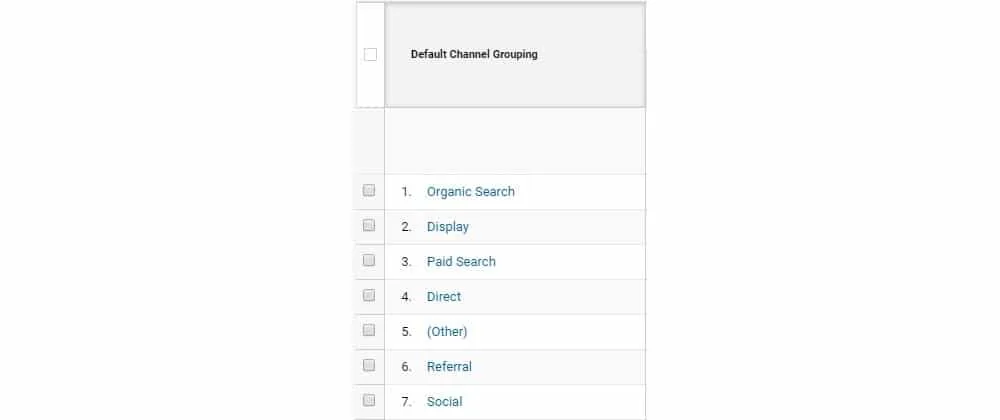
- Organic Search – free traffic from search results in search engines such as Google, Bing, and Yahoo.
- Display – traffic from display ads, e.g. Google Display Network – Google Ads
- Paid Search – traffic from search engine results that comes from paid advertising via Google Ads or another paid search platform
- Direct – represents all visitors who entered pages on your website either by typing the relevant URLs directly into the browser or by using their list of favorite websites – more below.
- Other – if traffic does not fit any other channel, it will end up here
- Referral – traffic you acquire because a user finds you on another website on the internet, e.g. on another blog, online forum, portal, etc.
- Social – traffic from a social network such as Facebook, LinkedIn, Twitter, or Instagram
However, this is only the beginning. Now that we have a basic understanding of the channels, let’s analyze direct and organic traffic in detail.
Direct traffic
This is traffic defined as visits without a referring page. Traffic to websites that does not come from search engines, blogs, social media, etc. We assume that this is traffic from users who type the website address directly into the browser or have it saved as a favorite website and open it by clicking a bookmark in the browser, arrive from mobile apps or messaging apps, and even from untagged email campaigns.
This is the type of traffic to which we would assign those visitors, but can we really treat this data as conclusive? It depends! I will answer that question now and present the solutions you should implement in order to analyze traffic correctly and make good decisions about promoting your website.
So let’s take a closer look at who the people visiting our website in this way are.
- mobile apps – traffic from mobile apps such as Facebook or Twitter often does not “fall into” the Social traffic type, but into Direct. This is worth keeping in mind, especially at a time when around 50% of traffic comes from mobile devices.
- employees – you and your company’s employees visit the website, modify products, test purchasing paths, or read blog posts. You need to filter out this traffic by excluding the company IP address or installing the Chrome browser extension Block Yourself from Analytics.
- customers – if customers frequently log in to a panel on your website, it may also be worth excluding this traffic or configuring a view in Google Analytics without this traffic.
- actual direct traffic – as I wrote earlier, these are users who type your website address into the browser or open it from a bookmark added to the browser
- messaging apps – traffic from instant messaging apps such as Skype, Messenger, WhatsApp, etc.
- applications – for managing social media (e.g. TweetDeck)
- links in documents – it is often the case that you will find links in documentation or online magazine issues; if you click those links, you will most likely “land” in Direct. This refers to a document (Word, PDF, XLS…) – provided the links have not been tagged
- email clients (Outlook, Thunderbird) – provided the links have not been tagged
- click-through from a domain using the https protocol to http
- offline campaigns – if you advertise in the press, hand out flyers, or advertise on radio or television
- shortened links – sometimes you shorten links for campaigns or presentations
However, you need to be aware that users who arrive through this traffic channel did not end up on your website by accident. It is the result of earlier marketing activities around the brand.
Unfortunately, another unpleasant surprise awaits us here – traffic in the Direct channel is underestimated! This happens because Google engineers and analysts claim that a direct visit was always preceded by some visit from a campaign. This makes sense when your brand is not recognizable; however, if it is, this methodology no longer makes sense. Returning to the topic, however – information about the channel through which a user enters the website has a validity period of as long as 6 months. If such a user enters our website by typing the address directly into the browser, their visit will be assigned to the last non-direct source of visits – e.g. a campaign, an entry from organic results, a referring website, or an email campaign. After such a visit is recorded, the 6-month period starts again!
The number of visits assigned to the Direct channel is therefore underestimated in favor of the remaining traffic channels.
I believe that thanks to this post you now understand this traffic channel better and are able to filter out the users who distort it. As a result, you will better understand the behavior of your website users and make the right decisions regarding planned marketing activities.
Organic traffic
This is the main channel companies compete for. It is traffic mainly from search engines such as Google, Bing, and Yahoo, excluding paid ads in those search engines. It is traffic powered by SEO. The better the ranking for valuable keywords, the greater the traffic from this channel. A website to which search-optimized content is added regularly will achieve better results – more traffic from search results.
Sources:
[1] https://moz.com/blog/guide-to-direct-traffic-google-analytics
[2] https://www.optimizesmart.com/understanding-channels-in-google-analytics/#a2
[3] https://www.smartbugmedia.com/blog/what-is-the-difference-between-direct-and-organic-search-traffic-sources
[4] https://pinkchart.pl/dlaczego-google-analytics-mowi-prawdy-o-zrodlach-odwiedzin-naprawic/
[5] https://www.adequate.pl/interact/czym-sa-wejscia-odwiedziny-bezposrednie

About the author
Radosław Mentel
Certified Google Partner (Ads & Analytics) with over 17 years of experience. For years, I've taught marketing at SGH and judged the best campaigns in Poland as a semKRK Awards judge.
More about me