35 pages from Google on how to make money over the holidays with Demand Gen and YouTube. I read them to save you time.
Table of contentsExpand
I had just one question: of everything they wrote about, what can actually be used in Polish accounts before Black Friday (November 27)?
The answer turned out to be more interesting than I expected. Google rarely admits in its documentation (playbooks) that a feature doesn’t work in a particular country. So instead of blindly trusting American statistics, I simply clicked through the accounts. The result? One of the playbook’s main recommendations won’t work here, because Poland is simply not on the list of supported locations.
Black Friday is less than 10 weeks away. Below you get a concrete overview: what actually works in Poland, what is only for Americans, and an action plan with dates, what to click and when, so you’re ready before the season.
Before you believe the numbers
The playbook is full of percentages: 94% of shoppers take the next step* after watching a video, and 68% trust creators. But these are surveys commissioned by Google, run in the US, among people who were already shopping for the holidays and watching YouTube. And the case studies are Walmart and General Motors. I’m not saying it’s nonsense. I’m saying it isn’t about your store.
*What Google means by „the next step”
In the terminology of Google and Ipsos research (which the Holiday Playbook materials refer to), „taking a further step” (taking action) is a broadly defined concept and does not mean only a direct purchase.
These are specific actions from the middle and bottom of the purchase funnel, including:
- Looking for more information: typing a product, brand or category name into Google Search or YouTube search right after watching the video.
- Going to a website or an app: clicking a link in an ad or in the video description, or typing the store or brand address into the browser by hand.
- Visiting a physical store: checking the location, opening hours or driving to a brick-and-mortar shop.
- Checking reviews and comparing prices: looking for other users’ reviews, comparing model specifications or verifying offers in price comparison sites.
- Talking or recommending: asking friends for their opinion or sharing a link to the video or product with them.
- Purchase (direct or delayed conversion): adding a product to the cart and completing the transaction online or offline.
What works for me and what doesn’t
Google rarely says in its playbooks which features are available in which countries. So I’ll tell you what works in my accounts. As of September 19, 2026:
| Feature from the playbook | In Poland | How I know |
|---|---|---|
| Demand Gen with a product feed | Works | I use it in campaigns |
| New customer acquisition goal | Works | I use it in campaigns |
| Optimized targeting | Works | I use it in campaigns |
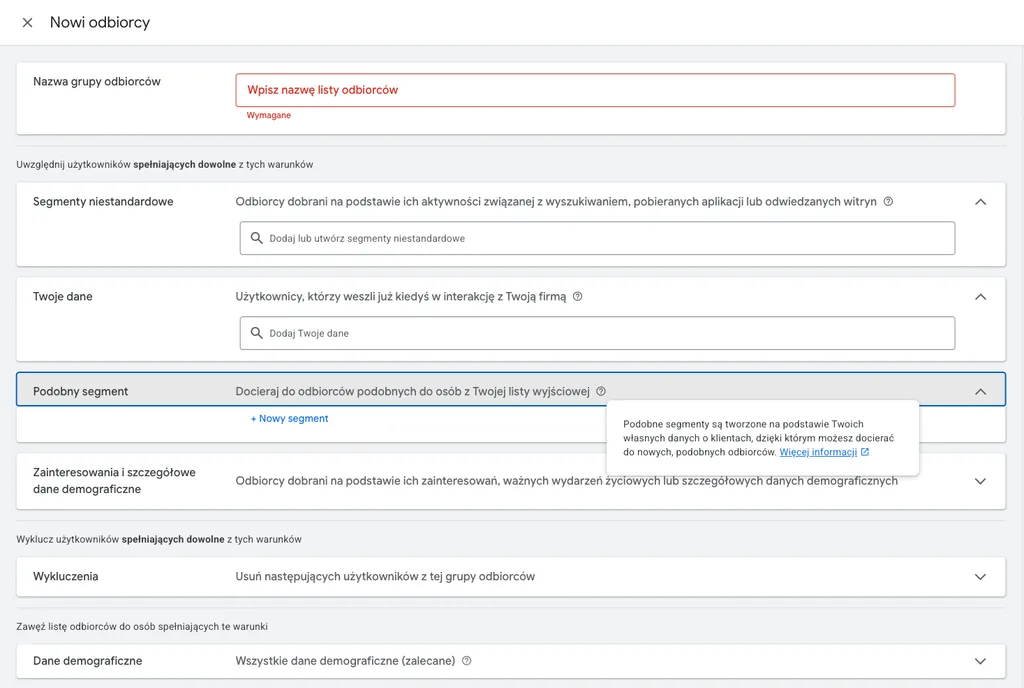
| Lookalike segments | Works | I use it in campaigns |
| „Created for you” audiences | Works | Visible when choosing audiences |
| Asset Studio with AI-generated images | Works (beta) | An option in the asset library |
| Promotions in ads | Works | The „Add promotion” window, and they can be added to Demand Gen |
| YouTube Creator Partnerships | Not available | A list of 24 countries in YouTube Help, Poland is not on it |
| YouTube Shopping affiliate program | Not available | A list of 14 countries in YouTube Help, Poland is not on it |
The biggest loss is creators. The playbook’s whole chapter on collaborations, boosts and „an average of 30% more conversions” relies on features that don’t exist in Poland. What’s left is betting on simple, authentic video instead of studio productions and adding it simply as assets in the panel. On the plus side: promotions can be added to Demand Gen, and the playbook advises using them during the season, because a clear discount makes an ad stand out and encourages a purchase.
New customers: same goal, different settings
The playbook recommends focusing on acquiring new customers, but it doesn’t mention that this is set up differently in Demand Gen and in Performance Max. In Demand Gen I have two options: bid higher for new customers, or bid only for new customers. In PMax there is a third one: a report only, without touching bids.
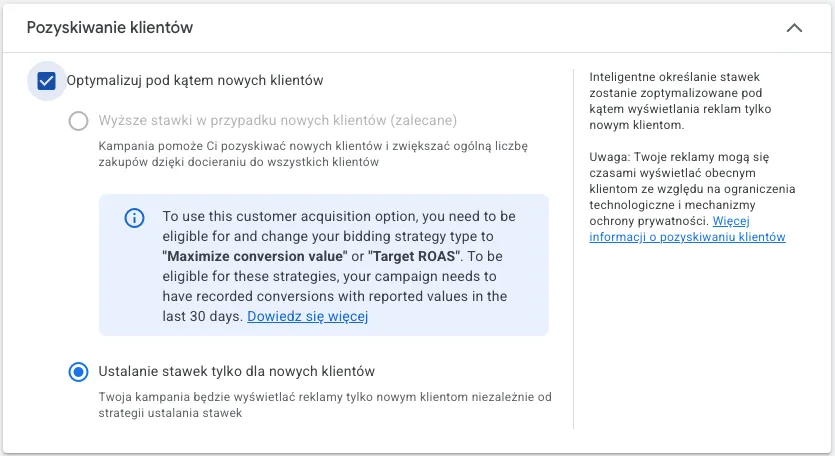
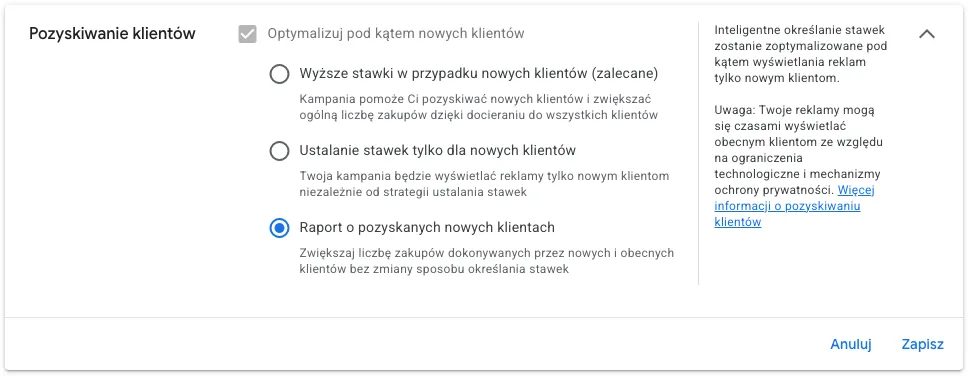
And here’s the catch. The higher bids option in Demand Gen only works with Maximize conversion value or Target ROAS, and only if the campaign has recorded conversions with a value in the last 30 days. If you bid on CPA or don’t pass a value, the option will be greyed out. Before you think about new customers, fix your data. I wrote about why the numbers in GA4 and Google Ads diverge in the post Why do conversions in GA4 and Google Ads differ? A complete guide to discrepancies.
Lookalike is no longer what it used to be
If you learned how to create lookalike segments from old guides, your picture is out of date. The rigid reach limits of 2.5%, 5% or 10% of users in a given location are going away. According to the Google Ads Help Center, in Demand Gen these levels become only a suggestion. The AI treats them as a starting point and may go beyond the set reach if it decides that will bring more conversions. If you prefer to keep the current level of control, Google provides a form to opt out of this update. It doesn’t give a firm rollout date, though, so it’s worth simply checking what you see in your own account.
The segment itself takes about 48 hours to generate, you can use up to 10 lists as seed lists, and their quality matters most, of course. The minimum size of the seed list? Google’s documents contradict each other here: one help article says more than 100 people, another says that threshold no longer applies, and the developer documentation requires 1,000 active matched people for Demand Gen. I would plan the list with a margin and aim for at least a thousand matched users.
The plan until November 27
Google’s Help says a Demand Gen campaign needs at least 50 conversions, and the daily budget should be at least 10 times the target CPA. With a $15 target CPA, that’s at least $150 a day (an example, not your numbers). This multiple applies to CPA bidding. I didn’t find an equivalent for Target ROAS in that part of the documentation, so there, set your budget so the campaign can realistically reach 50 conversions. For the learning period I assume four to six weeks, so a start around October 16. That’s my assumption, not something written in the documentation.
What if you don’t have enough sales to reach 50 conversions? Some specialists start with micro-conversions, for example add to cart, so the algorithm gets a signal faster. It’s a trade-off: you get more data, but you train the campaign on a less valuable event. I would consider it only with really low volume, and I would go back to purchases as soon as the data allows. But watch out for the catch: if a micro-conversion has no value assigned, you can’t use Maximize conversion value or Target ROAS, and without them the higher bids mode for new customers drops out.
- By September 30: clean up your data. Google tag gateway (the tag then loads from your own domain instead of Google’s servers, which helps recover measurement signal; it’s free and works through a CDN such as Cloudflare, Akamai, Fastly or Google Cloud Load Balancer), enhanced conversions, offline data import, conversion value. Customer Match lists must have at least 1,000 active people, but what counts is people matched to Google accounts, not uploaded addresses, so upload with a margin. If you don’t have this yet, it’s priority number one, because the implementation may require a developer or a CDN provider.
- By October 5: lookalike segments (because of the 48 hours), exclusions of existing customers, choosing the new customer acquisition mode.
- By October 16: launch the campaign with the feed and creatives.
- After that: don’t touch it. Google advises waiting for 30 to 50 conversions after every change before you judge the results.
Creatives. The playbook proposes a „rule of 3”: three images and three videos in three aspect ratios. That’s a recommendation from the playbook, not a requirement. Google’s specification supports four aspect ratios for images (1:1, 1.91:1, 4:5, 9:16) and four for videos (1:1, 16:9, 4:5, 9:16). The playbook heavily promotes AI tools in Asset Studio: Gemini Omni and Nano Banana for editing images and swapping backgrounds, and Veo for turning an image into video. In my account, image generation is in the panel (beta), but I don’t know yet how it handles prompts in Polish. I would approach it with caution: test it on a single image and watch brand consistency and AI artifacts before anything goes into a campaign.
How not to fool yourself in reports
Google Ads has a column called „Conversions (Platform Comparable)” that counts view-through conversions, meaning conversions after an ad was merely seen. The standard column doesn’t do that. When you compare Demand Gen with Search or PMax, look at the standard one, otherwise Demand Gen will look better than it is. And the „+16% iROAS (incremental Return on Ad Spend)” from the playbook comes from a study of about 400 brands. To check whether Demand Gen really brings additional revenue for you, you need a test, not data from a single column.
Experiment vs. a column in the panel
Columns in Google Ads report conversions according to the adopted attribution model. They see an event and assign credit to it. They don’t measure incrementality (iROAS), which answers the question: did this sale happen because of the ad, or just alongside it? To check that, you need an experiment with a control group (for example, a Conversion Lift study). The system withholds ads from part of the users and compares their behavior with the group that saw the ads. The difference in sales between those groups is your real revenue from Demand Gen.
Summary
From the playbook, it’s worth taking the data, audiences, budget and creatives. Leave the creators to the Americans. And finish cleaning up your data before mid-October. If you’d like me to take a look at your account before the season, I write about the cost and purpose of an audit in the post How much does a Google Ads audit cost, and when is it worth it? I have also covered Demand Gen in 2026, Performance Max and the change to Target CPA and Target ROAS goals.
FAQ
Frequently Asked Questions
I assume October 16, which is six weeks before November 27. Google talks about a minimum of 50 conversions, and how fast you collect them depends on your CPA and budget. With a low number of conversions, the launch has to move earlier, not later.
Bibliography
- Google, YouTube Holiday Playbook 2026 (PDF)
- Demand Gen campaign performance guide, Google Ads Help
- Demand Gen audiences overview, Google Ads Help
- Use Lookalike segments to grow your audience, Google Ads Help
- Use Lookalike segments in Demand Gen campaigns as a Targeting Constraint, Google Ads Help
- Lookalike audience segments, Google Ads API documentation
- Customer Match, Google Ads Help
- Set up Google tag gateway for advertisers with your CDN, Google Ads Help
- Demand Gen campaign creative: asset specifications and guidelines, Google Ads Help
- About conversions (Platform Comparable) columns, Google Ads Help
- YouTube Creator Partnerships: availability, YouTube Help
- YouTube Shopping affiliate program overview and eligibility, YouTube Help
- Demand Gen best practices, February 2026, Google Blog

About the author
Radosław Mentel
Certified Google Partner (Ads & Analytics) with over 17 years of experience. For years, I've taught marketing at SGH and judged the best campaigns in Poland as a semKRK Awards judge.
More about me